Funding your Xtrm digital wallet via direct bank transfer (ACH or Wire) is a fast, cost-effective way to manage company balances. To ensure seamless processing and prompt balance crediting, you can notify Xtrm in advance through your dashboard and optionally request an automated invoice.
Want to see how this works in real-time? Use the interactive demo below to click through the steps before reading the full guide.
Key Benefits & Details
Supported Transfer Methods: Wire, ACH, EFT, or local bank rails.
Invoicing Flexibility: Choose whether you need an electronic invoice generated for your finance team.
Processing Time: 3–5 business days (excluding weekends and bank holidays) once initiated from your financial institution.
Step-by-Step Instructions
Log In: Access your Xtrm company account dashboard.
Navigate to Funding: From the left-hand navigation menu, click Fund, then select Bank Transfer from the dropdown menu.
Select Invoice Preference:
Request Invoice: Select Yes if your finance department requires a formal billing document. An electronic invoice will be emailed within 24 hours to your designated finance contact (or to your Master Admin).
No Invoice: Select No to proceed directly to bank payment instructions.
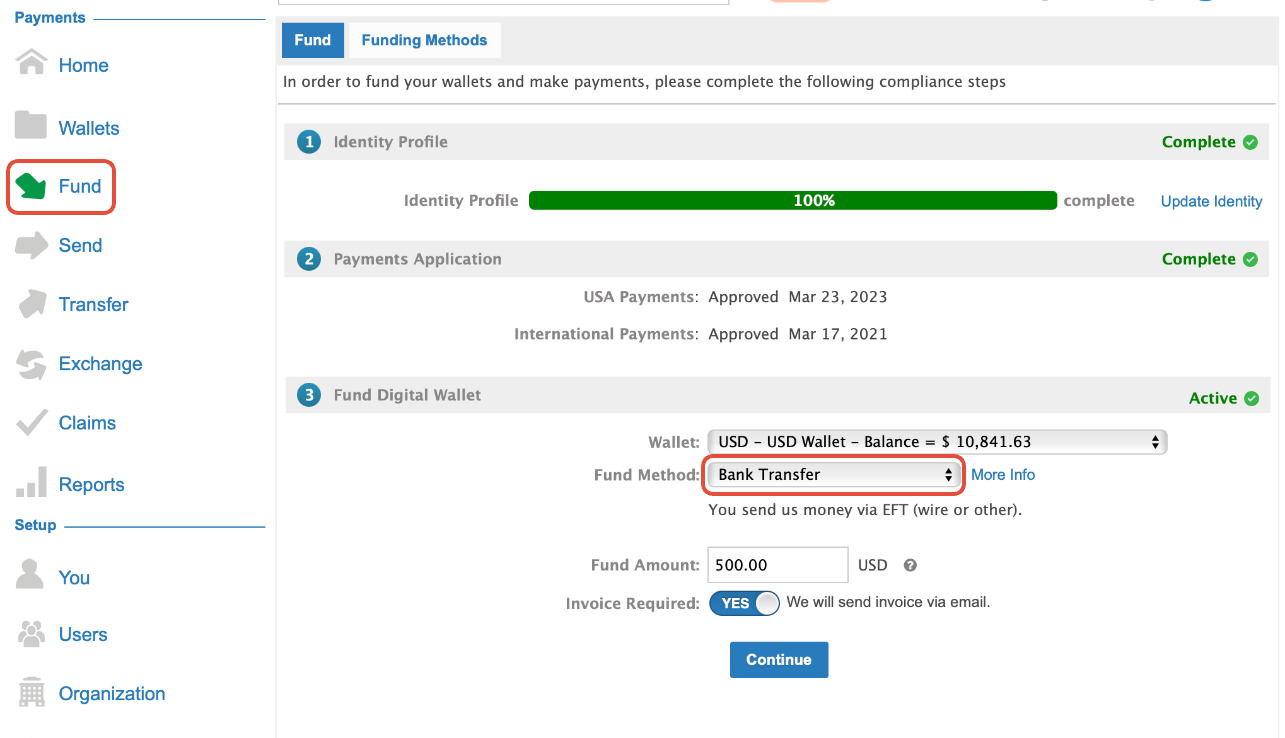
4. Complete The Form:
- Select the specific destination wallet to fund.
- Enter the intended funding amount and any special internal instructions.
- Note: Any applicable transfer fees will be clearly displayed.
5. Send Funds via Your Bank:
- Transfer funds using the currency-specific bank details displayed on-screen or on your invoice.
- Crucial Step: Include the unique Company Wire Reference (shown at the bottom of the confirmation screen) in your bank's payment reference/memo field.


6. Track Status:
- A Pending Credit transaction will immediately appear in your wallet.
- Once funds clear and are verified, the status will update to Completed, and the funds will become available for disbursement.
Alternative Option: Named Bank Accounts
For organizations managing frequent, recurring, or international funding flows, consider using an Xtrm Named Account.
Dedicated Virtual IBAN / Account Numbers: Get currency-specific receiving accounts issued directly in your company's legal name.
Automated Reconciliation: Partners or customers can wire directly to your business name without requiring manual advance notifications.
Faster Inbound Clearing: Streamlines international collections without opening local bank accounts worldwide.
Learn more and see setup instructions here: Xtrm Named Account Overview
Was this article helpful?
That’s Great!
Thank you for your feedback
Sorry! We couldn't be helpful
Thank you for your feedback
Feedback sent
We appreciate your effort and will try to fix the article