USER048 — Personal Account: Wallet Payment Received From Company Alert Email
Last updated: October 7, 2026
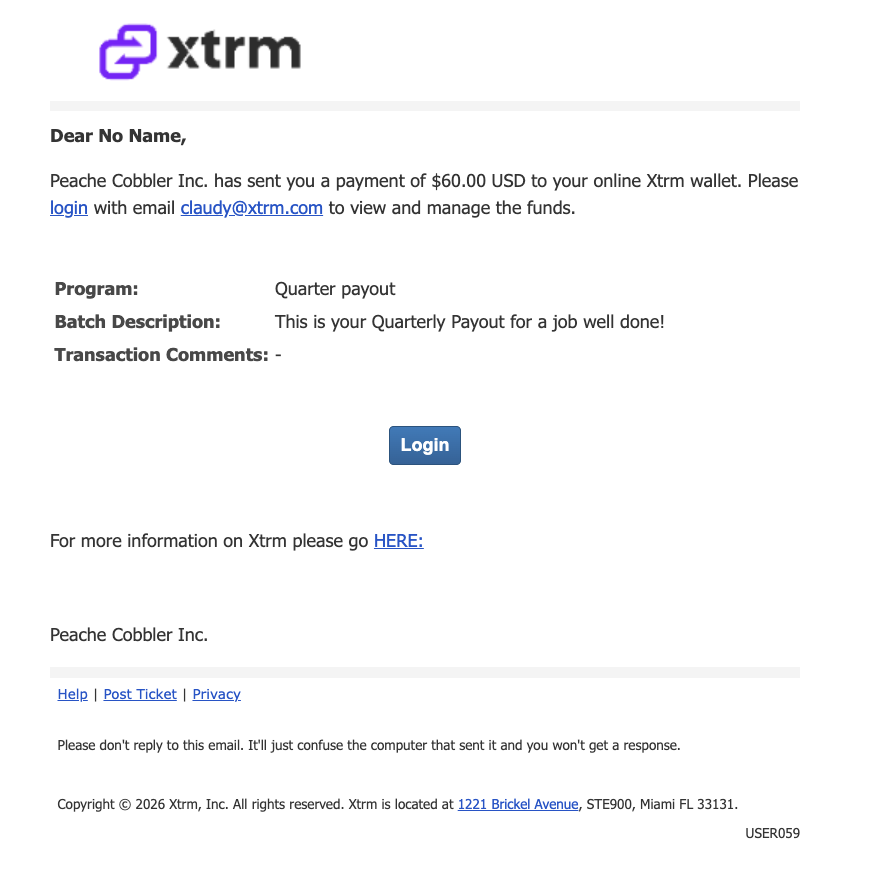
Wallet Payment Notification Email
This email is sent to an individual recipient when they receive a payment into their Xtrm wallet from a company. It serves as a secure notification and provides instructions for accessing and managing the payment.
Subject Line: Payment received from < Company Name >
Troubleshooting Missing Emails
If you do not receive the wallet payment notification email, follow these steps:
Check your inbox and spam or junk folders for emails from
[email protected] or [email protected].Add
[email protected] and [email protected]to your contact list.Ensure your IT department and Internet Service Provider (ISP) are not blocking emails from
@xtrm.com, any of its subdomains, or@xtrmmail.com.If you still cannot locate the email, you can access your wallet directly: Go to
xtrm.com, click Login, and use your email to log in or reset your password. Once logged in, you can view your wallet and any payments without needing the alert email.