Overview
If you no longer require your Xtrm account, you can request account closure through our support desk. Before closing your account, you must ensure that all wallet balances are fully withdrawn or transferred, as closing your account will permanently disable access to your wallet history and transaction records.
Prerequisites Before Closing Your Account
Before submitting an account closure request, please ensure you complete the following steps:
Zero Out Your Wallet Balance:
Withdraw any remaining funds to your linked bank account, or redeem them via gift card/Virtual Visa.
Your account balance must be $0.00 across all currency wallets prior to closure.
Download Account & Tax History:
Export or print any necessary transaction logs or tax reporting documents for your personal records, if needed.
How to Close Your Account
Option 1: Self-Service Account Closure (Recommended)
Log in: Go to xtrm.com and sign in to your account.
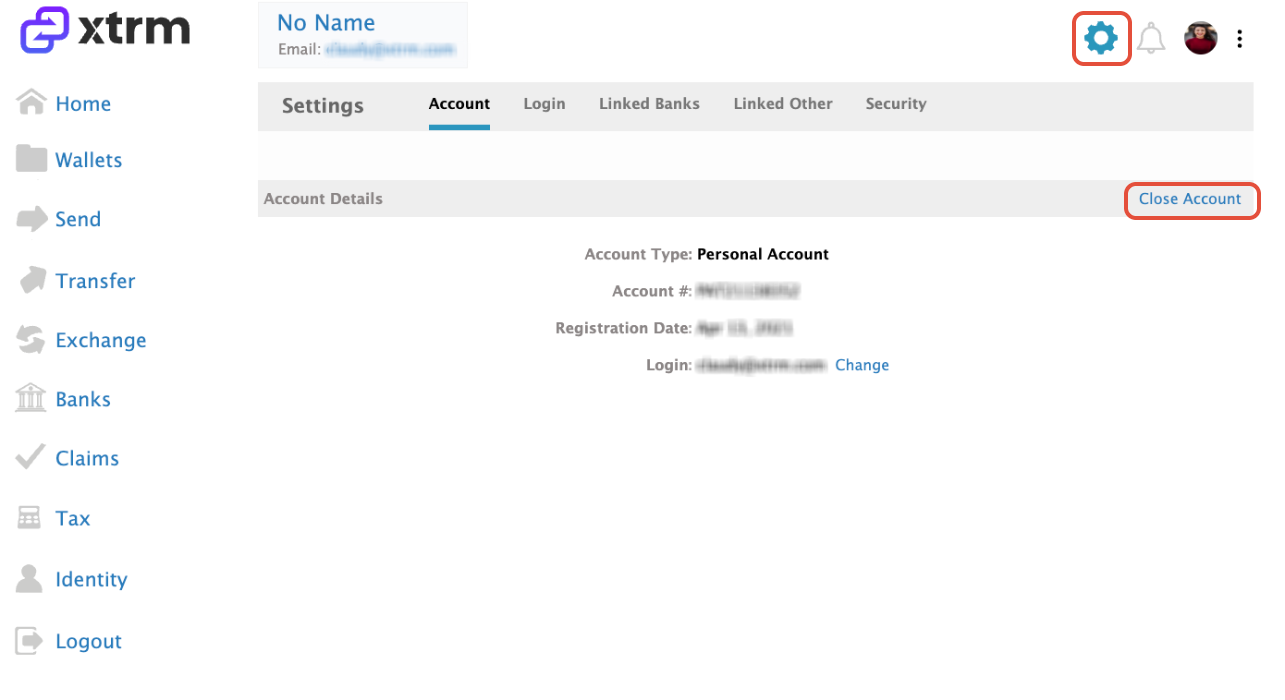
Access Settings: Click on the Settings gear icon located in the top-right corner.
Close Account: Click on Close Account and follow the on-screen prompts to confirm closure.
Option 2: Contact Support Desk
If you are unable to log in or experience issues closing your account via settings:
Send an email directly to support@xtrm.com or submit a ticket at our support desk.
Include your registered email address, full name, and a statement requesting account closure.
Was this article helpful?
That’s Great!
Thank you for your feedback
Sorry! We couldn't be helpful
Thank you for your feedback
Feedback sent
We appreciate your effort and will try to fix the article