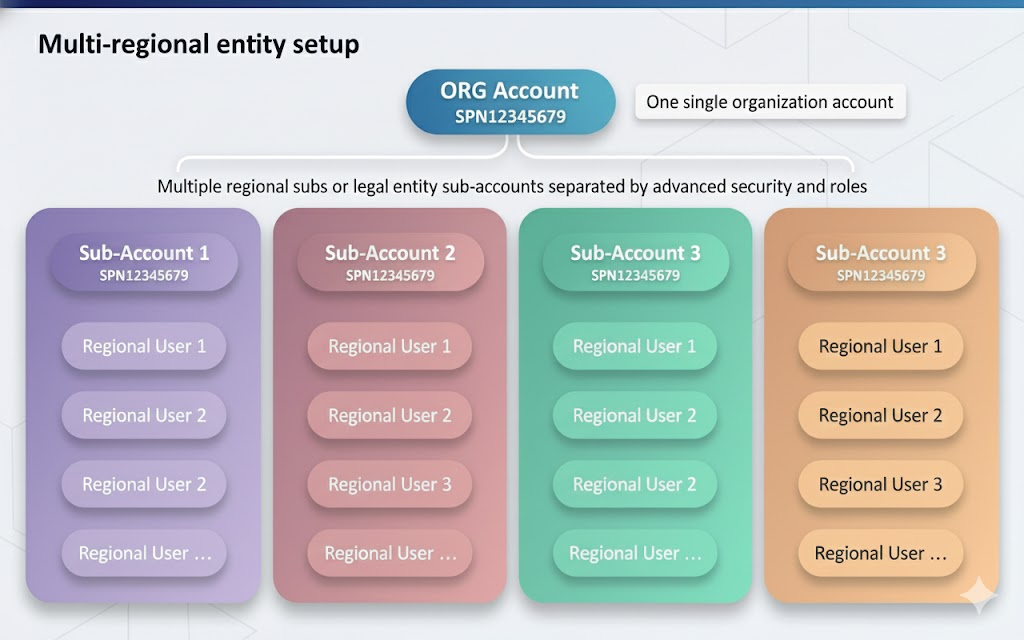
Xtrm is a global multi-tenant payment system. This means we have one organization account for a company worldwide with separate regional sub-account profiles for regional managers or regional legal entities (subsidiaries). It applies whether you are sending or receiving funds.
This setup provides Global compliance and reporting while maintaining secure separation of regional services and legal entities (subsidiaries).
Registration Steps:
1. Register your global headquarters company first:
For example, register ACME Inc (HQ) rather than ACME 1 or ACME 2. If you are registering a regional or local legal entity (subsidiary), you may initially register the company HQ using your email address, with the option to update the master admin at a later stage.
2. How to Register:
- Directly on the xtrm.com website.
- Automatically, upon receiving your first payment.
- Via Single Sign-On (SSO) if enabled
Access and Security
Access to regional wallets and funds is managed through role-based permissions and security settings:
- Regional offices can access only the wallets and functions relevant to their operations.
Security and compliance requirements are enforced on a regional basis while still enabling global account management and reporting.
- Simplified onboarding and accurate, faster payments ensure that only authorized users can access specific funds and services.
Key terms:
Term | Description |
| Company Account | This is your global account worldwide. It has a unique Organization ID - SPNXXXXXXXX. |
| Master Admin | This is the key global administrator. There is one master admin per global account. |
| Controller Users | These are your multi-regional or entity administrators. There can be any number of controller users. |
| Manager Users | These are your regional manager users. There can be any number of manager users. |
| Standard Users | These are your regional or program-specific users. There can be any number of standard users. |
| Wallets | Within an account, you can have as many currency wallets as you like. |
Compliance: During onboarding, Xtrm will verify that your company is legitimate.
Email and Domain Requirements: The master admin must use an individual email address tied to your company’s domain. Free email domains like @gmail.com or @yahoo.com are not accepted.
Identity Profile Completion: Completing your identity profile during onboarding is required to increase your identity level and payment limits.
- If you’re only receiving funds, ensure the "Identity" section profile is completed, which involves uploading the necessary identity documents. Understanding identity levels and limits for companies
Identity Levels and Limits: Remitters must complete the Advanced Services application to send payments.
Managing Partners Accounts: You can "Connect" with partners, customers, and suppliers to view additional transaction information.
Was this article helpful?
That’s Great!
Thank you for your feedback
Sorry! We couldn't be helpful
Thank you for your feedback
Feedback sent
We appreciate your effort and will try to fix the article