FEES001 — Company SaaS Plans & Fees
Last updated: November 4, 2026
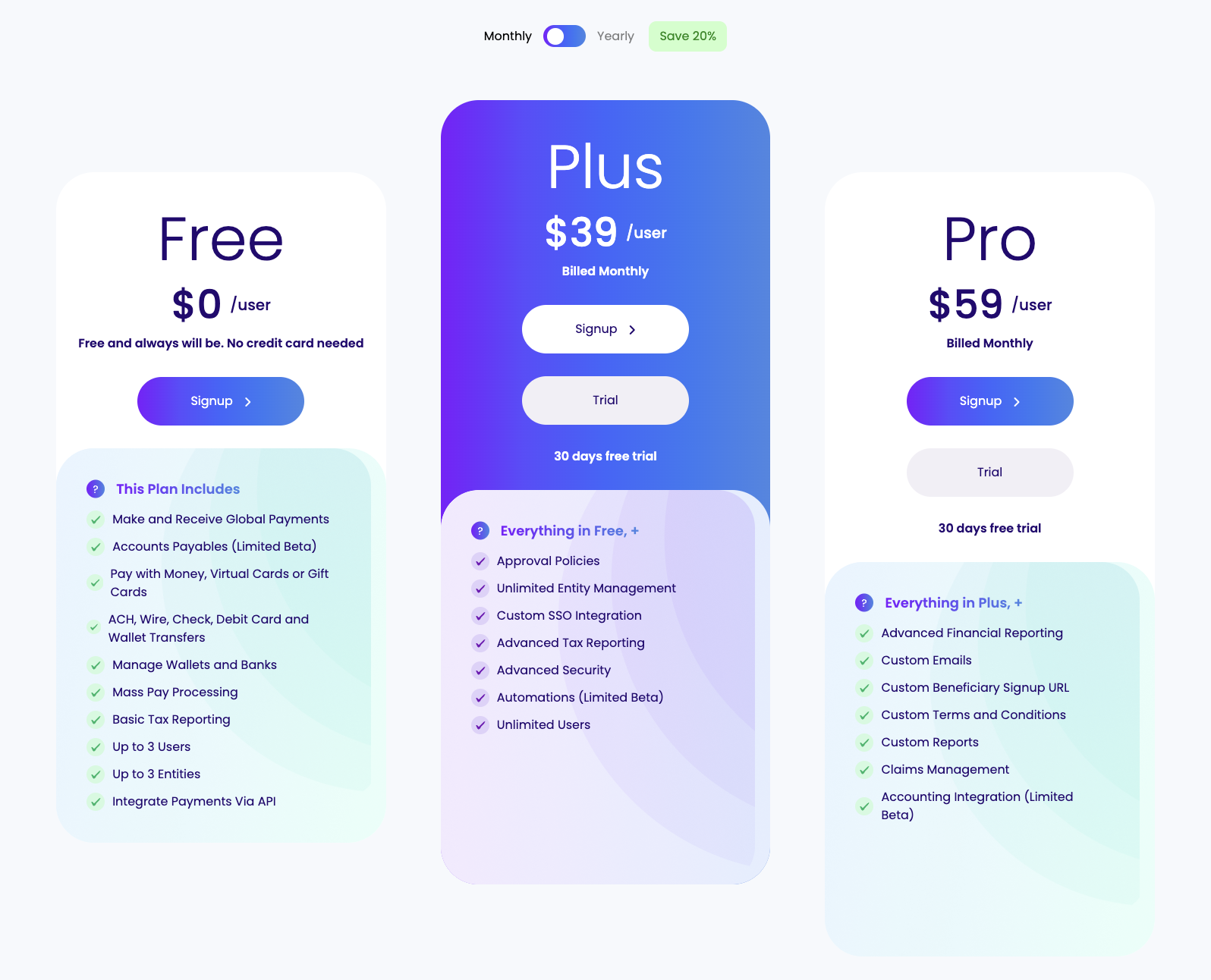
Xtrm offers four plans for company accounts, so you can start for free and add features as your business grows. This article covers what each plan costs, what it includes, and how billing and free trials work.
Plan comparison
Plan | Price | Best for | Key features |
Free | $0 | Core operations and standard payouts | Make and receive global payments; ACH, wire, check, debit card and wallet transfers; mass pay processing; basic tax reporting; payments via API. Up to 3 users and 3 entities. No credit card needed. |
Plus | $39 per user, per month | Growing businesses | Everything in Free, plus approval policies, unlimited users and entities, custom SSO integration, advanced tax reporting and advanced security. |
Pro | $59 per user, per month | Established organizations | Everything in Plus, plus advanced financial reporting, custom emails, a custom beneficiary signup URL, custom terms and conditions, custom reports, claims management and |
Enterprise | Custom pricing | Large organizations and platforms | A fully custom experience, API, Salesforce, platform integrations, and dedicated support. Pricing depends on scope. Contact [email protected] for a quote. |
Prices shown are monthly. Some features are in limited beta, including Accounts Payable, Automations and Accounting Integration.
How billing works
Per-user pricing: Plus and Pro are billed for each user on your account. Plus and Pro have no limit on the number of users, so your monthly cost grows with the number of users you add.
Monthly or yearly: You can pay month to month, or yearly and save 20%.
Transaction fees: Plan prices cover your subscription only. Payment transaction fees, such as ACH, wire and international transfer fees, are separate. Contact [email protected] for details on transaction fees for your account.
30-day free trial
You can try Plus or Pro free for 30 days, with no obligation. You don't need a credit card to start a trial.
If you don't upgrade by the end of the trial, your account returns to your previous plan.
How to view or change your plan
Log in to your Xtrm company account.
At the top of any page, find your current plan badge (for example, Pro) and click View Plans.
Choose a plan, then select Signup to subscribe or Trial to start a 30-day free trial.