ONBOARD001 — Onboarding Your Company Overview
Last updated: September 22, 2026
What company onboarding involves
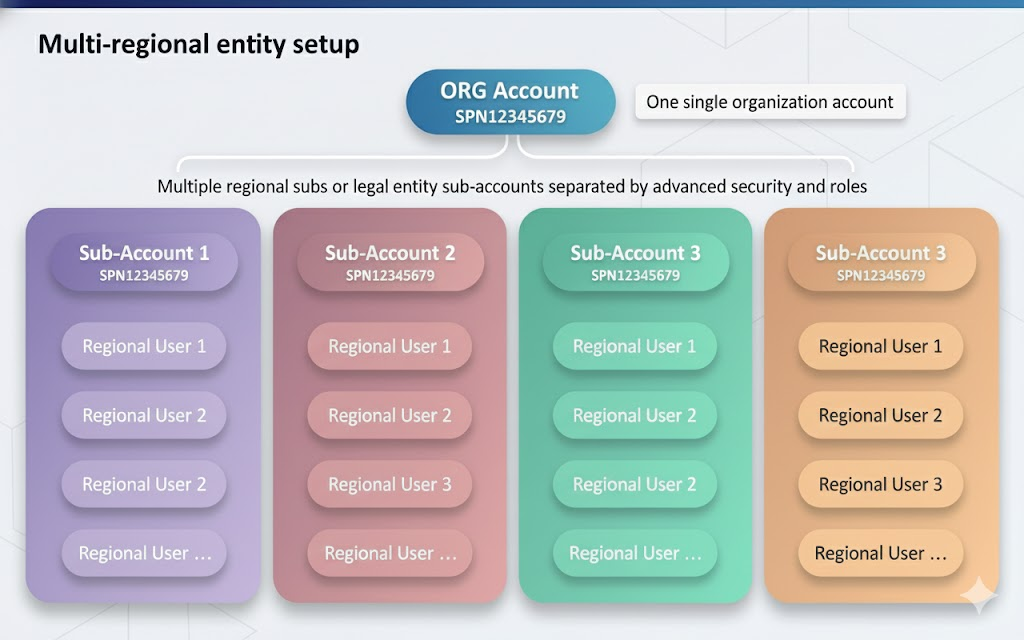
Xtrm is a global, multi-tenant payment platform. Your company operates under a single global organization account, with separate regional sub-accounts for subsidiaries, legal entities, or team managers. This keeps compliance and tax reporting centralized while keeping regional operating funds isolated from one another. Important: If your parent company already has a Xtrm account, subsidiaries or regional entities should be created as regional entities and wallets under that existing global organization—not as separate company accounts.
Account hierarchy and user roles
Term / role | Description | Access level |
|---|---|---|
Company account | Global entity umbrella, identified by a unique Organization ID ( | Global |
Master Admin | Primary administrator responsible for global settings and entity setup | One per global account |
Controller | Administers multiple regions, subsidiaries, or legal entities | Multi-regional |
Manager | Regional lead handling localized payment activity and wallets | Regional |
Standard user | Operational staff running specific programs or payouts | Program-scoped |
Three ways to register
Route | Best for | How it works |
|---|---|---|
Direct web registration | Most companies | Sign up at xtrm.com |
Automated first-payment onboarding | Recipients being paid by an existing Xtrm customer | An account is created automatically on receipt of a first payout via API or mass payment file |
SSO or branded portal | Enterprise clients | Onboard via SAML/SSO or a branded URL such as |
What registration involves
1. Register your global headquarters. Register your corporate HQ entity first — ACME Inc HQ, not a local branch.
Email requirement: You must register with an email address on your official company domain (for example, [email protected]). Consumer domains such as @gmail.com and @yahoo.com are rejected automatically.
2. Verify your email and accept the agreement. Click the verification link sent to your corporate address, then review and accept the Xtrm Services Agreement.
3. Complete your Identity Profile (IDL). Provide corporate tax documentation and government-issued ID for the account administrator. A more complete profile unlocks higher transfer limits.
4. Apply for Advanced Services — sending companies only. If your company intends to send payments, submit an Advanced Services application. Approval takes up to 48 hours for US-only payments and up to 2 weeks for international payouts. This step is not required to receive payments.
Security and regional isolation
Wallet isolation — Regional branches and sub-entities see and manage only the wallets assigned to their operational scope.
Global oversight — Controllers and the Master Admin retain full auditing, currency conversion, and reporting visibility across every sub-account.
Multi-currency support — A single account can hold any number of currency wallets, letting you separate departmental budgets or client balances.