BANK001 — Why Was My Bank Transfer Returned?
Last updated: October 7, 2026
If your funds have been returned after a bank transfer, it's usually due to incorrect bank details. Below are common reasons and steps to resolve the issue. Make sure the bank details entered match the details on the bank account — if they don't, the transfer could be returned.
Common reasons for returned transfers
Incorrect bank details
Ensure your bank details are entered accurately. Even a small typo in the account number or bank code can cause the transfer to fail and be returned. Here's what you can do:
Log in to your account and double-check the bank details you provided.
Make sure the entered details match exactly with those on your bank account.
The name on the bank account must match the name you entered — if they don't align, the transfer could be rejected and returned.
If you see error codes like 'RUTA Bank Unable to Apply' or 'INVALID RECEIVER DETAILS', this indicates the receiving bank could not post the payment due to a mismatch or missing beneficiary or bank detail. Verify all beneficiary details line by line against the destination country's requirements, particularly the account holder name, account number including all digits and leading zeros, branch name or code, SWIFT/BIC, and account type.
Verify that the bank address details are complete and accurate. In some cases, using the correct full bank branch address rather than an abbreviated or incorrect address can resolve rejection issues. Review the linked bank account details with your banking representative to confirm all information is accurate.
If you see return code RR04, this means “Compliance: rejection due to the bank's internal policy.” The sending platform does not receive further details beyond this code, so contact your receiving bank directly to understand the specific reason or requirements causing the rejection.
When linking a bank account, the beneficiary address must match exactly what the bank has on file for that account. If your bank account documentation, such as from Grey or Clear Junction, only provides the bank's physical address and does not show a separate beneficiary or account holder address, use that bank address in the beneficiary information fields.
To prevent "Creditor Name Mismatch" failures, confirm the exact account holder name with the receiving bank or app before retrying the transfer. The name used in Xtrm must match exactly what the receiving institution has on file, including capitalization.
If you see error code 'BE01', this specifically indicates a beneficiary name mismatch — the name you entered does not match the receiving bank's records. This error is not related to SWIFT/BIC code issues. To resolve: (1) Contact the receiving bank to confirm the exact account holder name registered on the account, (2) update the beneficiary name in your bank details to match exactly what the receiving bank has on file — capitalization must match exactly, then (3) retry the transfer.
If your transfer was returned with "Bank unable to apply," this typically indicates an account name or number mismatch or incorrect currency or beneficiary setup. To resolve this, confirm your complete bank details, including name, account or IBAN, SWIFT, currency, and bank address, with your bank, then delete and relink your bank account with the verified information.
Disabled or closed bank account
The banking partner will cancel the payment, and it will not complete.
Update your bank account details with an active account and re-initiate the transfer to receive the funds.
Currency mismatch
If you linked a bank account with the wrong currency, such as adding a UK GBP account as USD, the transfer will be returned. To correct this:
Delete the existing bank link that was added with the incorrect currency.
Re-add the bank account with the correct country, such as United Kingdom, and local currency, such as GBP.
Ensure you use the exact account name and number.
Re-initiate the transfer to the correctly configured bank account.
USA-specific issues
If you see an error indicating the routing (ABA) number is incorrect, but it matches the one on your check, consider the following:
Wire transfers vs. ACH transfers. Banks often use a different routing number (ABA) for wire transfers than the one used for ACH transfers. Double-check which type of transfer you initiated and confirm the corresponding routing number:
Contact your bank for clarification.
Use online resources to verify the routing numbers for your bank.
Why did it take so long for the funds to be returned?
Banks process ACH and wire transfers through a clearing system. Here's how the process works:
If incorrect details are entered, the transfer is still sent but may be rejected by the receiving bank.
Once rejected, it can take the banks an additional 1 to 10+ business days to return the funds. Unfortunately, these timeframes are beyond our control.
Once the funds are returned, they're credited back to your wallet. This typically takes a couple of hours, but may take until the next business day.
What happens when a transfer is rejected?
When a transfer is rejected or returned, we open an investigation with our banking partner to determine the reason for the return. You should also contact your receiving bank directly to gather more information and confirm that your account is set up to receive incoming transactions.
Determine if the receiving bank can provide additional information about why the transfer was returned.
Confirm that your account is set up to receive incoming transactions.
How to correct bank details
To avoid future issues, follow these troubleshooting steps:
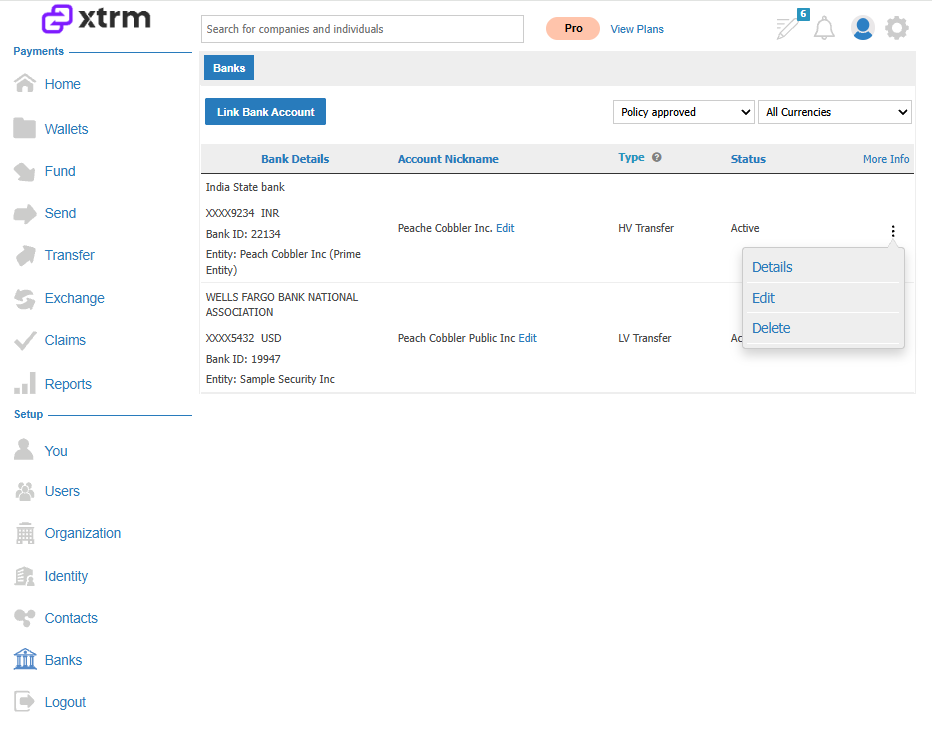
Open Linked Bank Accounts and delete the failing bank link.
Re-link the bank account and confirm:
Account holder name exactly matches the bank record.
Correct account number is entered.
Correct routing number for your transfer type:
ACH routing for ACH transfers.
Wire routing for domestic wire transfers.
Bank address details are complete and accurate, including the full bank branch address rather than an abbreviated or incorrect address.
Re-initiate the transfer from the same currency wallet as the bank account's local currency.
If the transfer fails again after following these steps, provide the exact error text from Wallet Activities, the transfer method chosen (ACH or wire), and the last 4 digits of the account number for further investigation.
Bank policy rejections
Some transfers may be rejected due to the recipient bank's internal policies, even when all account details are correct. If you suspect this is the case:
Contact your recipient bank directly to confirm why the transfer was rejected.
Ask the bank whether they can accept future transfers from Xtrm.
If the bank confirms the account can receive transfers, notify Xtrm Support with this information for next steps.
Still experiencing transfer failures?
If you've verified your bank details and transfers continue to fail, contact Xtrm Support with your complete banking information:
Beneficiary bank details:
Beneficiary name
Beneficiary bank name and address
Bank code
Branch code
Account number
SWIFT code
Intermediary bank details (if applicable):
Bank name
SWIFT code
Currency
Xtrm Support can coordinate with the banking partner to update these details and prevent further returns.