SECURITY005 — IP and Device Access Security
Last updated: September 1, 2026
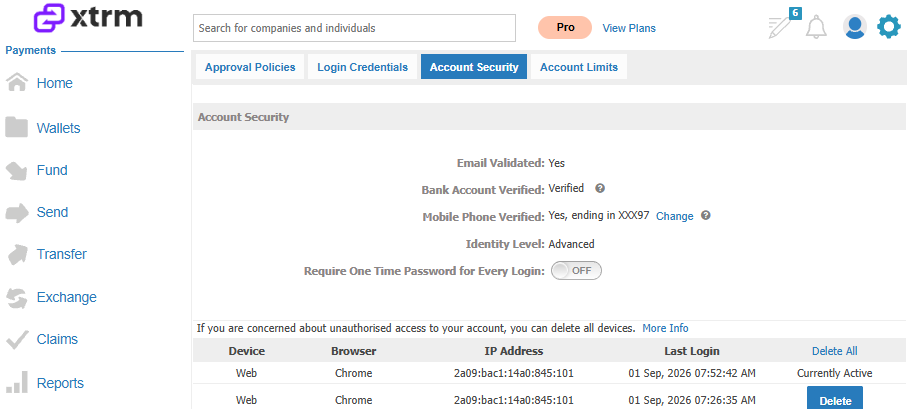
The device list in your Xtrm account tracks all the computers and mobile devices currently logged into your account. If you notice a device you don't recognize, remove it from the list — this ensures that if it tries to log in again, it will have to go through the standard 2-step authentication method. We also recommend changing your password for added security.
How to review and remove devices
Access the Security page. Click the settings in the top-right corner of the screen, then select Security from the dropdown menu.
Review your device list. On the Account Security page, find the section listing all devices currently logged into your account, and review it carefully.
Remove unrecognized devices. Click on any device entry you don't recognize, then select the option to remove or delete it from your account.
Change your password. For added security, update your account password following the prompts to create a new, strong one.
Following these steps helps keep your account secure and ensures any unrecognized devices are removed promptly.